Skip to content
Planning & modelling

Model the decisions that shape your clients' financial lives.

Income, spending, KiwiSaver, investments, property, debt and goals in one projection, built from the client group's records under your firm's assumptions. Then take the chosen plan into advice covering planning, investments, KiwiSaver and insurance.

Available by invitation to New Zealand advice firms. Request a demo to explore suitability and access.

Planner / Status quo
Status quo to timeline in under a minute.
  • Life events
  • Scenarios
  • Chance of success
  • KiwiSaver
  • Goals
  • Property and debt
  • Stress tests
  • Statement of Advice

From projection to advice, in one place

Four parts of the same flow: model the client's position, explore alternatives, test KiwiSaver and investment choices, then turn the chosen plan into advice.

Planner / Ask
Ask the planner a question. It changes the plan, reruns it and explains what moved.

Financial modelling

One projection, built from the client's records.

People, Cashflow, Wealth, Timeline and Assumptions in one workspace, with growth, cashflow, chance of success and goals on top. Life events move the plan, and every chart updates as you go. The classic planner is still available.
  • Life events: retire, downsize, spending phases, aged care, plus what-ifs such as trauma or inheritance
  • Goals with cost, timing and priority, and a Goals chart showing projected affordability
  • Property and debt: multiple loans, rate periods, offsets, funding sources and where sale proceeds go
  • Ask the planner in plain English: it edits the plan, reruns the simulations and shows the before and after
  • Results in future or today's dollars, with a read-only view for presenting
Planner guide
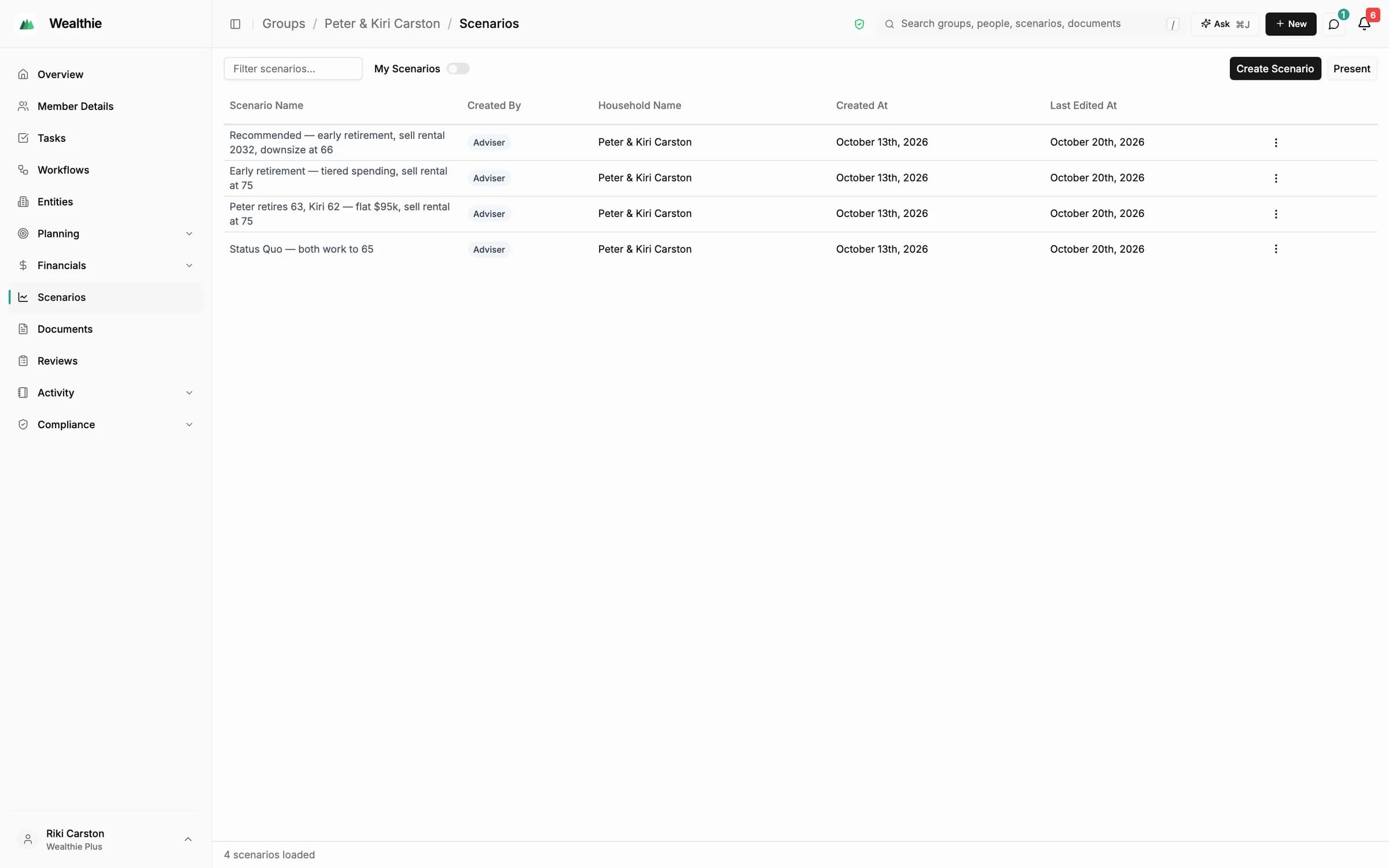
Groups / Peter & Kiri Carston / Scenarios
The group's scenarios: status quo, early retirement options and the recommendation

Scenario planning

Scenarios you can explore together.

Build a status quo from the client's records, model alternatives, then compare, solve and stress-test them with the same engine and assumptions.
  • Start from household data, a blank model, or a copy with updated details
  • Compare with the status quo; differences are classed as assumption, starting-position or strategy
  • Solver moves one lever, such as retirement age or a lump sum, until your chosen target is met
  • Stress tests: market crash, death, disability, trauma, redundancy or living longer, or replay 1987, the dot-com bust, the GFC or COVID-19
  • Label options Status quo, Recommended and Alternative for the advice
Creating scenarios
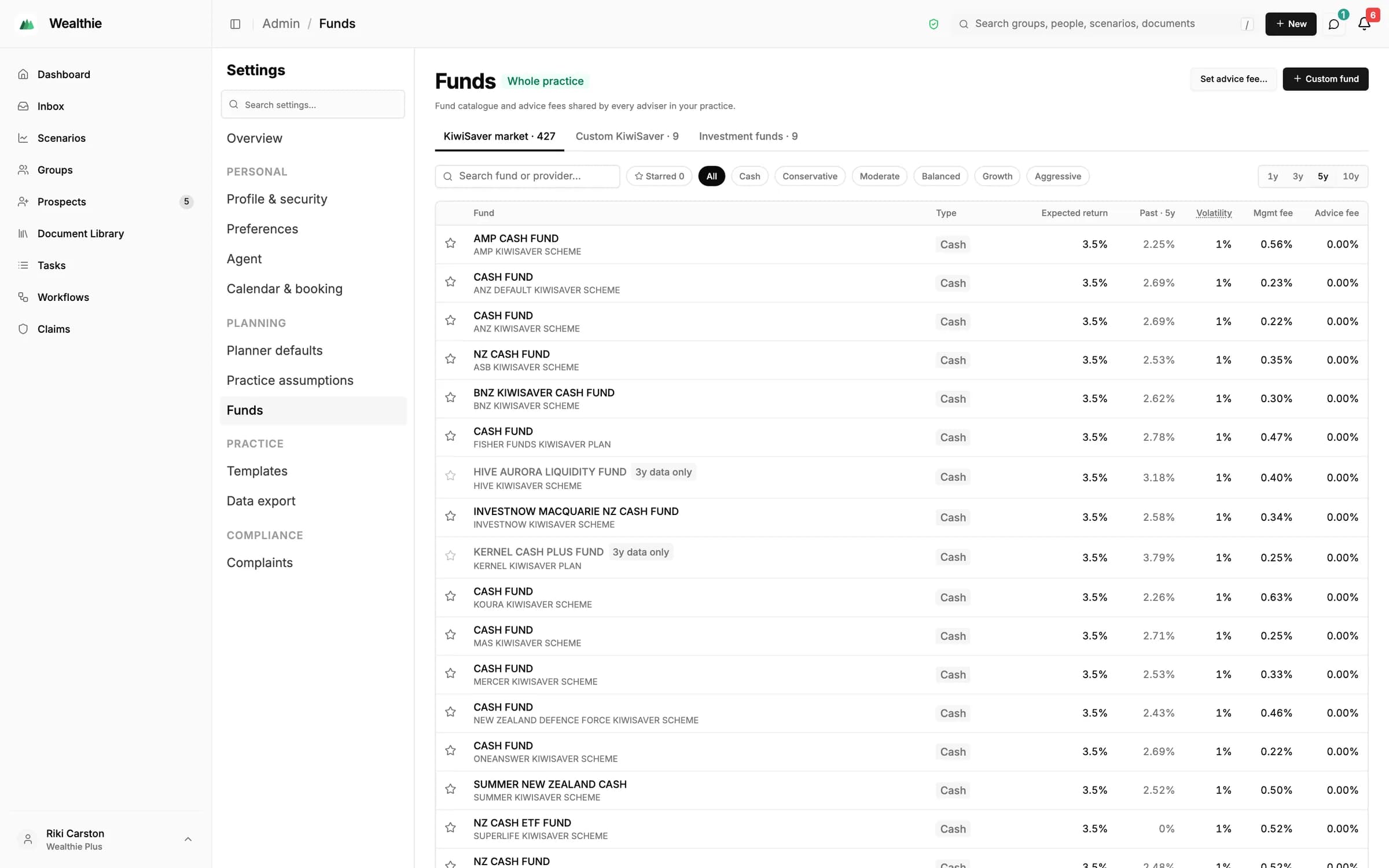
Settings / Funds
Fund catalogue with KiwiSaver market funds, expected returns, volatility and fees

KiwiSaver and investments

Test KiwiSaver and investment choices against the plan.

KiwiSaver and investments sit in the same projection as income, spending and property, so a contribution or fund change shows up in growth, cashflow, goals and chance of success.
  • Employee KiwiSaver rates of 3.5%, 4%, 6%, 8% and 10%; the default employee and employer rate is 3.5%
  • A fund catalogue with KiwiSaver market funds, expected returns, volatility and fees
  • Chance of success from seeded Monte Carlo runs, so the same inputs return the same results
  • Firm-wide assumptions set the starting point for new scenarios
Defaults and funds
Planner / Present
Pick the scenarios, then present them to the client.

Advice planning

Build advice from the plan the client chose.

Advice planning covers planning, investments, KiwiSaver and insurance. Wealthie assembles the inputs and drafts the Statement of Advice; the adviser decides what is recommended and what is issued.
  • Pick the scenarios and present them to the client
  • Eight guided stages, from client and scope to review, then a draft for your review
  • Insurance has its own record of advice, built from the last 24 months of evidence on file
  • Workflows take it on to present, issue, implement and schedule the next review
Planning SOA guide

Inside the planner

Status quo to recommendation, view by view.

The same scenario, seen through each view the planner gives you and your client.

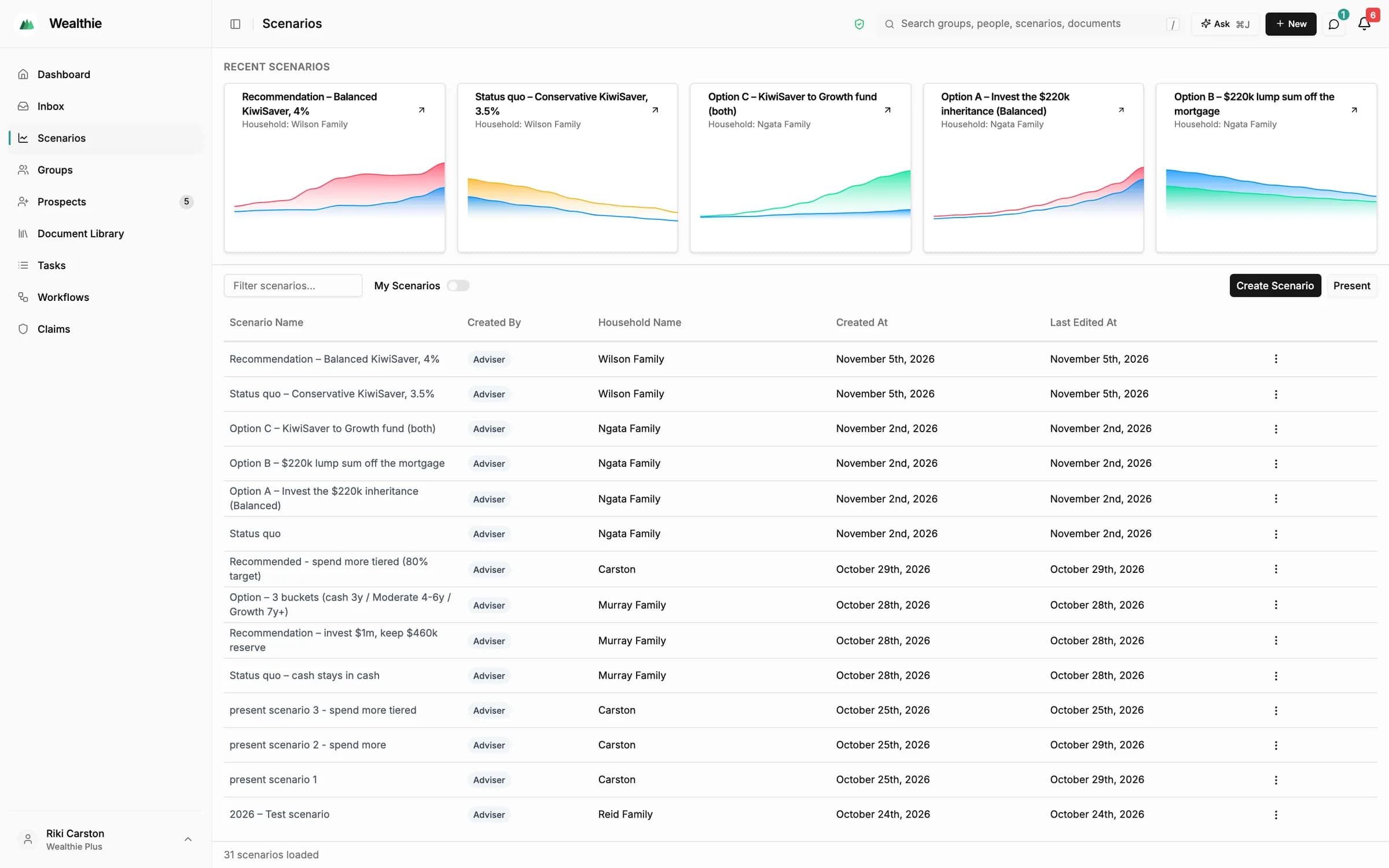
All scenarios

Every scenario across your client groups, with a preview of each, so you can pick up where you left off.
Scenarios
Scenarios list with recent scenario previews across client groups

How it works

From a planning session to an issued plan.

Scenarios feed the advice. Each step stays with the adviser.
  1. 01

    Start from the records

    Household data, a blank model, or a copy with updated details.
  2. 02

    Check inputs and suggestions

    Review populated balances and suggested property, goals and what-if events.
  3. 03

    Create alternatives

    Change life events; linked inputs move with each event.
  4. 04

    Compare, solve and stress-test

    Compare with the status quo, solve for an adviser-set target, or replay a historical crisis with a bad, average or good start. Run through the AI assistant or the Wealthie connector.
  5. 05

    Label the options

    Mark Status quo, Recommended and Alternative for the advice.
  6. 06

    Prepare the Statement of Advice

    Eight guided stages produce a draft for your review. Drafts are never visible to clients.
  7. 07

    Present, issue and implement

    Workflows carry the advice through to implementation and the next review. Advice workflows

Planning and modelling questions

See the planner with a demonstration group

Available by invitation to New Zealand advice firms. Request a demo to explore suitability and access.